<?xml version="1.0" encoding="utf-8"?><feed xmlns="http://www.w3.org/2005/Atom" ><generator uri="https://jekyllrb.com/" version="3.10.0">Jekyll</generator><link href="https://cmc-qcl.github.io/HPC-research-computing/feed.xml" rel="self" type="application/atom+xml" /><link href="https://cmc-qcl.github.io/HPC-research-computing/" rel="alternate" type="text/html" /><updated>2026-04-23T19:18:24+00:00</updated><id>https://cmc-qcl.github.io/HPC-research-computing/feed.xml</id><title type="html">High-Performance Computing at CMC QCL</title><subtitle>HPC research computing onboarding resources and updates.</subtitle><entry><title type="html">Laguna SSH Key Issue and Workaround</title><link href="https://cmc-qcl.github.io/HPC-research-computing/Laguna-SSH-Key-Issue-and-Workaround/" rel="alternate" type="text/html" title="Laguna SSH Key Issue and Workaround" /><published>2025-11-03T16:30:00+00:00</published><updated>2025-11-03T16:30:00+00:00</updated><id>https://cmc-qcl.github.io/HPC-research-computing/laguna-ssh-key-issue</id><content type="html" xml:base="https://cmc-qcl.github.io/HPC-research-computing/Laguna-SSH-Key-Issue-and-Workaround/"><![CDATA[<h2 id="pre-requisite-ssh-key-pair">Pre-requisite: SSH Key Pair</h2>

<p>If you haven’t generated your SSH private key and public key pair,</p>

<ol>
  <li>Open Terminal (Mac) or Windows Subsystem for Linux (Windows)</li>
  <li>Generate an RSA key pair:</li>
</ol>

<div class="language-jsx highlighter-rouge"><div class="highlight"><pre class="highlight"><code><span class="nx">ssh</span><span class="o">-</span><span class="nx">keygen</span> <span class="o">-</span><span class="nx">t</span> <span class="nx">rsa</span> <span class="o">-</span><span class="nx">b</span> <span class="mi">4096</span>
</code></pre></div></div>

<p>Just enter-enter-enter to accept the default options. This will generate two files under .ssh folder.</p>

<ul>
  <li>Private key: id_rsa (this should not be shared with anyone.)</li>
  <li>Public key: id_rsa.pub (this is a public key, i.e., no secret)</li>
</ul>

<ol>
  <li>Open your public key, id_rsa.pub, from ~/.ssh folder and copy all text contents. It should start with “ssh-rsa” followed by a bunch of alphanumeric characters.</li>
</ol>

<h2 id="manually-adding-public-ssh-key-to-laguna">Manually Adding Public SSH Key to Laguna</h2>

<p>An alternative is to use Open Ondemand to add their public ssh key to their “home_directory/.ssh/authorized_keys” file:</p>

<ol>
  <li>Open OOD (<a href="https://laguna-ood.carc.usc.edu/">https://laguna-ood.carc.usc.edu/</a>)</li>
</ol>

<p><img src="/HPC-research-computing/images/laguna-ssh-key-issue/Screenshot_2025-09-15_at_3.05.25_PM_(2).png" alt="Screenshot 2025-09-15 at 3.05.25 PM (2).png" /></p>

<ol>
  <li>Click the menu, Files</li>
  <li>
    <p>Click Home Directory</p>

    <p><img src="/HPC-research-computing/images/laguna-ssh-key-issue/Screenshot_2025-09-15_at_3.05.32_PM_(2).png" alt="Screenshot 2025-09-15 at 3.05.32 PM (2).png" /></p>
  </li>
  <li>
    <p>Check “Show Dotfiles” box</p>

    <p><img src="/HPC-research-computing/images/laguna-ssh-key-issue/Screenshot_2025-09-15_at_3.05.41_PM_(2).png" alt="Screenshot 2025-09-15 at 3.05.41 PM (2).png" /></p>
  </li>
  <li>Click on .ssh folder</li>
  <li>Click Edit for authorized_keys</li>
</ol>

<p><img src="/HPC-research-computing/images/laguna-ssh-key-issue/Screenshot_2025-09-15_at_3.05.54_PM_(2).png" alt="Screenshot 2025-09-15 at 3.05.54 PM (2).png" /></p>

<ol>
  <li>
    <p>Add public ssh key (id_rsa.pub) to end of the authorized_keys file and save</p>

    <p><img src="/HPC-research-computing/images/laguna-ssh-key-issue/Screenshot_2025-09-15_at_3.06.07_PM_(2).png" alt="Screenshot 2025-09-15 at 3.06.07 PM (2).png" /></p>
  </li>
</ol>

<h2 id="ssh-to-laguna-without-password">SSH to Laguna without Password</h2>

<p>Now it’s time to check if you can ssh to the Laguna server without password.</p>

<ol>
  <li>Open your terminal (Mac) / Bash for Git or CMD (Windows)</li>
  <li>
    <p>Type the following ssh command:</p>

    <p>Example of my ssh command:</p>

    <p><em>$ ssh JehoPark@cmc.edu@laguna.carc.usc.edu</em></p>

    <p><img src="/HPC-research-computing/images/laguna-ssh-key-issue/Screenshot_2025-09-15_at_3.06.49_PM_(2).png" alt="Screenshot 2025-09-15 at 3.06.49 PM (2).png" /></p>
  </li>
</ol>

<h2 id="checking-shell-access-from-ood">Checking Shell Access from OOD</h2>

<ol>
  <li>Open Laguna OnDemand</li>
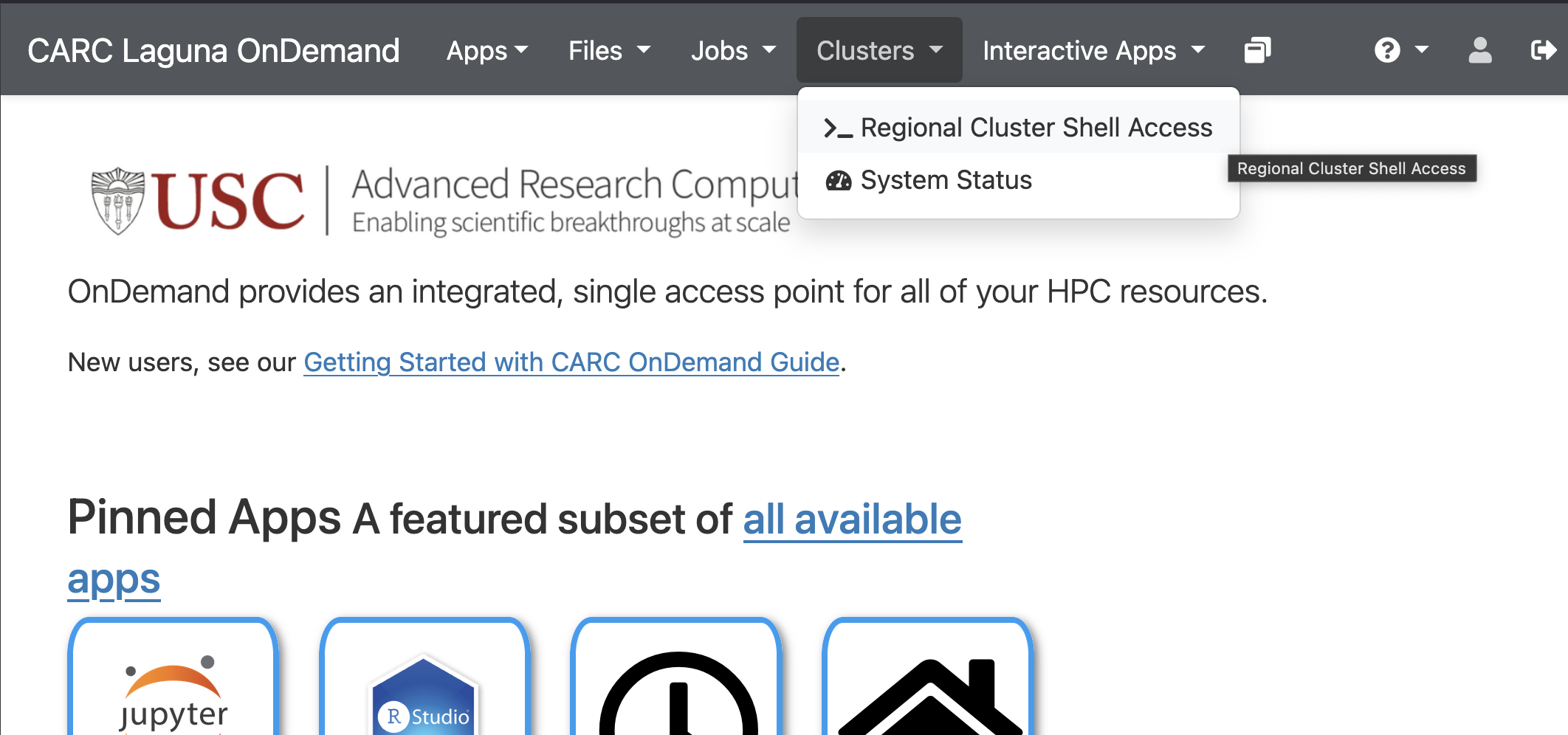
  <li>Click on the meny, Cluster, and then choose &gt;_Regional Cluster Shell Access</li>
</ol>

<p><img src="/HPC-research-computing/images/laguna-ssh-key-issue/Screenshot_2025-09-15_at_3.29.00_PM.png" alt="Screenshot 2025-09-15 at 3.29.00 PM.png" /></p>

<ol>
  <li>
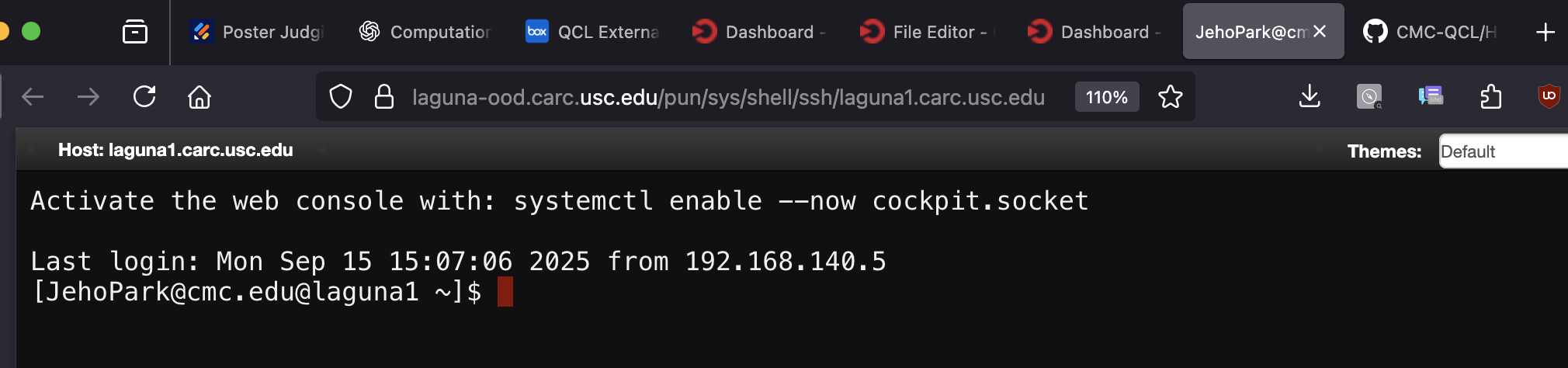
    <p>If the manual SSK key setup went well, you should see the following shell access from your browser.</p>

    <p><img src="/HPC-research-computing/images/laguna-ssh-key-issue/Screenshot_2025-09-15_at_3.30.39_PM.png" alt="Screenshot 2025-09-15 at 3.30.39 PM.png" /></p>
  </li>
</ol>

<p>We’ve heard that the browser shell access is not working even after manually adding the SSH public key. Please use your terminal or Git Bash.</p>]]></content><author><name>CMC QCL</name></author><category term="research-computing" /><category term="hpc" /><category term="research" /><category term="cmc" /><category term="qcl" /><summary type="html"><![CDATA[Solutions for SSH key configuration issues on Laguna, including how to generate SSH keys and manually add them to authorized_keys via Open OnDemand.]]></summary></entry><entry><title type="html">Laguna Prerequisites</title><link href="https://cmc-qcl.github.io/HPC-research-computing/laguna-prerequisites/" rel="alternate" type="text/html" title="Laguna Prerequisites" /><published>2025-06-07T16:30:00+00:00</published><updated>2025-06-07T16:30:00+00:00</updated><id>https://cmc-qcl.github.io/HPC-research-computing/laguna-prerequisites</id><content type="html" xml:base="https://cmc-qcl.github.io/HPC-research-computing/laguna-prerequisites/"><![CDATA[<h1 id="carc-account">CARC Account</h1>

<p>In this session, we will be working with you to make sure you have an account on the Laguna cluster.</p>

<ol>
  <li>Open <a href="https://hpcaccount.usc.edu">https://hpcaccount.usc.edu</a></li>
  <li>Choose your school (It will bring you to your school’s SSO)</li>
  <li>Check if you are assigned to the Project named “CMC_Onboarding”</li>
  <li>If you have any trouble, let us know.</li>
</ol>

<p>For additional information, check out CARC’s Getting Started guide:
<a href="https://uschpc.github.io/regional-computing-website/user-guides/get-started-laguna.html">https://uschpc.github.io/regional-computing-website/user-guides/get-started-laguna.html</a></p>]]></content><author><name>CMC QCL</name></author><category term="research-computing" /><category term="hpc" /><category term="research" /><category term="cmc" /><category term="qcl" /><summary type="html"><![CDATA[Steps to set up your CARC account on the Laguna cluster, including account verification through the HPC Account Manager.]]></summary></entry><entry><title type="html">Introduction to HPC Resources</title><link href="https://cmc-qcl.github.io/HPC-research-computing/intro-to-hpc-resources/" rel="alternate" type="text/html" title="Introduction to HPC Resources" /><published>2025-06-07T15:30:00+00:00</published><updated>2025-06-07T15:30:00+00:00</updated><id>https://cmc-qcl.github.io/HPC-research-computing/introduction-to-hpc-resources</id><content type="html" xml:base="https://cmc-qcl.github.io/HPC-research-computing/intro-to-hpc-resources/"><![CDATA[<h2 id="regional-hpc-cluster-laguna">Regional HPC Cluster: Laguna</h2>
<p><img src="/HPC-research-computing/images/hpc-intro/socal-research-computing-alliance.png" alt="SoCal Research Computing Alliance" class="img-67-centered" /></p>

<p>Hosted at the University of Southern California (USC) and managed by the Center for Advanced Research Computing (CARC), Laguna is a state-of-the-art system boasting 2 shared login nodes, 20 compute nodes, and 8 GPU nodes. Through an extensively collaborative effort, the SoCal Regional Research Computing Alliance hopes that access to this advanced computing environment and comprehensive user services will propel local campus research forward exponentially.</p>

<table>
  <thead>
    <tr>
      <th>Category</th>
      <th>Function</th>
      <th>Qty</th>
      <th>Notes</th>
    </tr>
  </thead>
  <tbody>
    <tr>
      <td>Public facing</td>
      <td>Login node</td>
      <td>1</td>
      <td>Dual AMD EPYC 9354 3.25GHz (32C/64T) w/   384 GB</td>
    </tr>
    <tr>
      <td>Computing</td>
      <td>Compute node</td>
      <td>16</td>
      <td>Dual AMD EPYC 9554 3.1GHz (64C/128T,   256M Cache) CPU     384 GB memory per node</td>
    </tr>
    <tr>
      <td>Computing</td>
      <td>GPU node</td>
      <td>8</td>
      <td>Dual EPYC 9354 3.25GHz (32C) + Dual   Nvidia L40s GPU (18K CUDA cores, 568 Tensor cores, and 48GB GDDR6 mem) w/   768GB mem</td>
    </tr>
    <tr>
      <td>Network</td>
      <td>Interconnection</td>
      <td>N/A</td>
      <td>Mellanox CX-7 InfiniBand NDR (200 Gbps)</td>
    </tr>
    <tr>
      <td>Storage</td>
      <td>/home &amp; /project</td>
      <td>4</td>
      <td>Dual AMD Epyc 9224 2.5GHz (24C/48T) w/192GB memory 12 x 15TB NVMe SSD (4 x 180TB = 720TB)</td>
    </tr>
  </tbody>
</table>

<h2 id="national-supercomputers-access">National Supercomputers: ACCESS</h2>

<p><img src="/HPC-research-computing/images/hpc-intro/nsf-access.png" alt="NSF Access Collection" class="img-67-centered" /></p>

<p>ACCESS is a collection of integrated advanced digital resources and services that provide easy access to the most advanced computational resources and scientific research support in the world. QCL has two Campus Champions who are trained to help local users utilize national supercomputing resources available through the NSF Access program. From various national supercomputing facilities, QCL has awarded a large number of computing hours for testing and developing scientific applications (see below).</p>

<table>
  <thead>
    <tr>
      <th>Name</th>
      <th>Facility</th>
      <th>SU (Core Hours)</th>
    </tr>
  </thead>
  <tbody>
    <tr>
      <td>ANVIL CPU</td>
      <td>Purdue</td>
      <td>100,000 SUs</td>
    </tr>
    <tr>
      <td>ANVIL GPU</td>
      <td>Purdue</td>
      <td>1,000 SUs</td>
    </tr>
    <tr>
      <td>Bridges Extreme Memory</td>
      <td>PSC</td>
      <td>1,000 Core Hours</td>
    </tr>
    <tr>
      <td>Bridges-2 GPU</td>
      <td>PSC</td>
      <td>2,500 GPU Hours</td>
    </tr>
    <tr>
      <td>Bridges-2 Regular Memory</td>
      <td>PSC</td>
      <td>50,000 SUs</td>
    </tr>
    <tr>
      <td>DARWIN Compute Node</td>
      <td>UD</td>
      <td>20,000 SUs</td>
    </tr>
    <tr>
      <td>DARWIN GPU</td>
      <td>UD</td>
      <td>400 SUs</td>
    </tr>
    <tr>
      <td>EXPANSE CPU</td>
      <td>SDSC</td>
      <td>50,000 Core Hours</td>
    </tr>
    <tr>
      <td>EXPANSE GPU</td>
      <td>SDSC</td>
      <td>2,500 GPU Hours</td>
    </tr>
    <tr>
      <td>Jetstream</td>
      <td>Indiana U</td>
      <td>50000 SUs</td>
    </tr>
    <tr>
      <td>KyRIC Large Memory Nodes</td>
      <td>Kentucky Research Informatics Cloud</td>
      <td>1,000 Core hours</td>
    </tr>
    <tr>
      <td>OSG</td>
      <td>Multiple</td>
      <td>200,000 SUs</td>
    </tr>
    <tr>
      <td>Rockfish - GPU</td>
      <td>Johns Hopkins</td>
      <td>500 GPU hours</td>
    </tr>
    <tr>
      <td>Rockfish - Large Memory</td>
      <td>Johns Hopkins</td>
      <td>1,000 Core hours</td>
    </tr>
    <tr>
      <td>Rockfish - Regular Memory</td>
      <td>Johns Hopkins</td>
      <td>20,000 Core hours</td>
    </tr>
    <tr>
      <td>Stampede2</td>
      <td>TACC</td>
      <td>1,600 Node Hours</td>
    </tr>
  </tbody>
</table>

<p>The Service Unit (SU) is like a currency used to run an application on supercomputers. Supercomputer users are charged by SUs (hours of runtime on one core). For example, if an application ran on 100 cores for 10 hours, 1,000 SUs will be deducted from your account.</p>

<p>The Campus Champion allocations can be used to test computational research applications. To test out the supercomputers, please make an appointment with one of the CMC Campus Champions (email: qcl@cmc.edu).</p>

<h2 id="local-hpc-qcl-gpu-machine">Local HPC: QCL GPU Machine</h2>
<p><img src="/HPC-research-computing/images/hpc-intro/nvidia.webp" alt="QCL NVIDIA DGX system" class="img-33-centered" /></p>

<p>QCL has an NVIDIA DGX system having four Tesla V100 GPUs.</p>

<table>
  <thead>
    <tr>
      <th>Component</th>
      <th>Spec</th>
    </tr>
  </thead>
  <tbody>
    <tr>
      <td>GPUs</td>
      <td>4X Tesla V100</td>
    </tr>
    <tr>
      <td>TFLOPS (Mixed precision)</td>
      <td>500</td>
    </tr>
    <tr>
      <td>GPU Memory</td>
      <td>128 GB total system</td>
    </tr>
    <tr>
      <td>NVIDIA Tensor Cores</td>
      <td>2,560</td>
    </tr>
    <tr>
      <td>NVIDIA CUDA Cores</td>
      <td>20,480</td>
    </tr>
    <tr>
      <td>CPU</td>
      <td>Intel Xeon E5-2698 v4 2.2 GHz (20-Core)</td>
    </tr>
    <tr>
      <td>System Memory</td>
      <td>256 GB RDIMM DDR4</td>
    </tr>
    <tr>
      <td>Data Storage</td>
      <td>Data: 3X 1.92 TB SSD RAID 0</td>
    </tr>
    <tr>
      <td>OS Storage</td>
      <td>OS: 1X 1.92 TB SSD</td>
    </tr>
    <tr>
      <td>Network</td>
      <td>Dual 10GBASE-T (RJ45)</td>
    </tr>
  </tbody>
</table>

<h2 id="local-hpc-qcl-server">Local HPC: QCL Server</h2>

<p><img src="/HPC-research-computing/images/hpc-intro/database-server.jpg" alt="QCL Database server machine" class="img-left-wrap" /></p>

<p>At the QCL, we have a Dell server machine with 2 CPUs (32 cores) and 512 GB of memory. It is currently repartitioned to serve a database server and a data storage.</p>

<div class="clear-float"></div>]]></content><author><name>CMC QCL</name></author><category term="research-computing" /><category term="hpc" /><category term="research" /><category term="cmc" /><category term="qcl" /><summary type="html"><![CDATA[Overview of HPC resources available at CMC QCL, including local servers, GPU systems, Laguna cluster, and national supercomputing access through NSF ACCESS.]]></summary></entry></feed>